---
title: What happens when I receive a booking request?
description: Steps taken after you receive your first request
---
[Skip to content](https://helpcenter.pastorstays.com/en/what-happens-when-i-receive-a-booking-request#main-content)
English
Show submenu for translations
[Contact Us](https://helpcenter.pastorstays.com/en/kb-tickets/new?hsLang=en)
[](https://app.pastorstays.com)
Open main navigation
Close main navigation
- English
Show submenu for translations
- [Contact Us](https://helpcenter.pastorstays.com/en/kb-tickets/new)
- [Log in/Sign up](https://app.pastorstays.com/auth/signin?callbackUrl=https%3A%2F%2Fapp.pastorstays.com%2F)
[Log in/Sign up](https://app.pastorstays.com/auth/signin?callbackUrl=https%3A%2F%2Fapp.pastorstays.com%2F)
How can we help you?
- There are no suggestions because the search field is empty.
1. [PastorStays Help Center](https://helpcenter.pastorstays.com/en/?hsLang=en)
2. [Hosts](https://helpcenter.pastorstays.com/en//hosts?hsLang=en)
# What happens when I receive a booking request?
## This article outlines the steps taken to review your pending booking requests.
---
**1. Receive an email about your new booking request on PastorStays.**
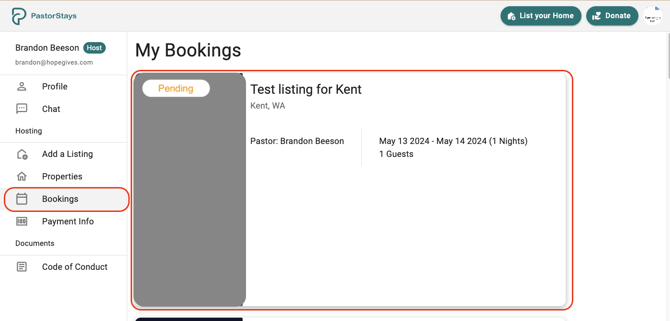
**2. Go to your Profile and click the bookings tab. **
- From here you can select the the pending booking request.
**3. Review the booking request details**
- Click on Review Guest details to see more information on the Minister.
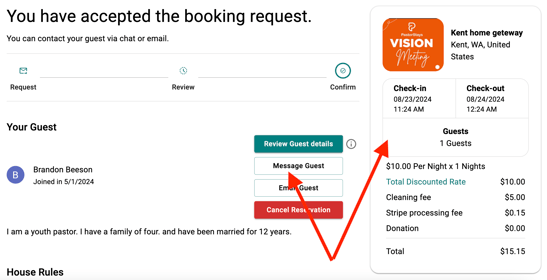
**4. Last Step is to click Approve or Decline. **
- If Approved, PastorStays will collect the fees from the minster and deposit this into your account.
We want our hosts to feel comfortable **declining any booking request**. We only ask that you communicate the reason for the declined request to the minister.
Are you declining lots of requests? **Consider refining your calendar with our [helpful tools.](https://helpcenter.pastorstays.com/en/how-does-blocking-dates-work?hsLang=en)**
- [Ministers](https://helpcenter.pastorstays.com/en//ministers?hsLang=en)
- [Hosts](https://helpcenter.pastorstays.com/en//hosts?hsLang=en)
- [Ambassadors](https://helpcenter.pastorstays.com/en//ambassadors?hsLang=en)
- [General](https://helpcenter.pastorstays.com/en//general?hsLang=en)
[.png?width=100&height=94&name=PastorStays%20ff-01%20(7).png "PastorStays ff-01 (7)")](https://helpcenter.pastorstays.com/?hsLang=en)
[mailto:hello@pastorstays.com](mailto:hello@pastorstays.com)
Copyright © 2024,