---
title: How does blocking dates work?
description: Blocking dates in PastorStays
---
[Skip to content](https://helpcenter.pastorstays.com/en/how-does-blocking-dates-work#main-content)
English
Show submenu for translations
[Contact Us](https://helpcenter.pastorstays.com/en/kb-tickets/new?hsLang=en)
[](https://app.pastorstays.com)
Open main navigation
Close main navigation
- English
Show submenu for translations
- [Contact Us](https://helpcenter.pastorstays.com/en/kb-tickets/new)
- [Log in/Sign up](https://app.pastorstays.com/auth/signin?callbackUrl=https%3A%2F%2Fapp.pastorstays.com%2F)
[Log in/Sign up](https://app.pastorstays.com/auth/signin?callbackUrl=https%3A%2F%2Fapp.pastorstays.com%2F)
How can we help you?
- There are no suggestions because the search field is empty.
1. [PastorStays Help Center](https://helpcenter.pastorstays.com/en/?hsLang=en)
2. [Hosts](https://helpcenter.pastorstays.com/en//hosts?hsLang=en)
# How does blocking dates work?
## Whether your home is a short-term rental, a second home, or your primary residence, blocking dates is simple and easy to do.
**Hosts can:**
- Block dates within a specific window of time (e.g., allow bookings only up to 90 days ahead of time).
- Block out specific dates.
- Sync with any calendar system, such as Google Calendar, Airbnb, VRBO. etc."
### **3 ways to block dates**
To edit your listing: Go to your **Profile** -\> **Properties** -\> Click **update** under each listing.
#### **1. Availability window**
Located in Step 1 of the edit listing flow, this setting allows you to limit how far in advance your property can be booked. In the example below, bookings are only available up to 30 days in advance. Any dates beyond the next 30 days will not be available for booking..
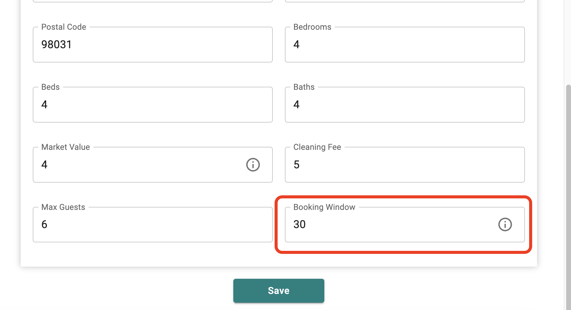
Availability window will automatically roll forward the predetermined amount of days. Other previously booked dates will still show up as being blocked, even if they are within the availability window.
---
#### **2. Blackout Dates**
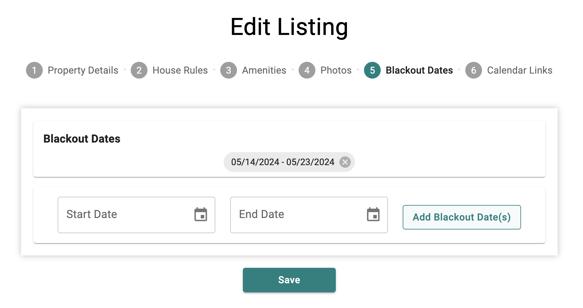
In step 5 of the edit listing process, you can manually block dates that are unavailable for booking on your property. Choose the **"Start date"** and **"End date,"** then click the **"add blackout Dates"** button. After clicking **Save,** these dates will be blocked on your calendar.
---
#### **3. Calendar Syncing**
Sync your PastorStays calendar with other platforms like Airbnb or VRBO.
---
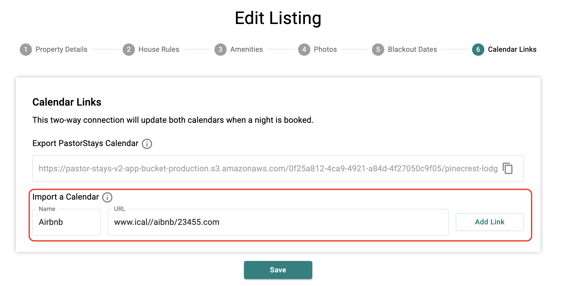
**Import Calendar:** Receive blocked dates from other calendars by simply adding the URL provided from other platform like Airbnb or VRBO. Give the calendar a name, and click "**add link".** Please click **Save** to apply these changes.
> Now, any booking made on Airbnb will appear on your PastorStays calendar as blocked dates.
---
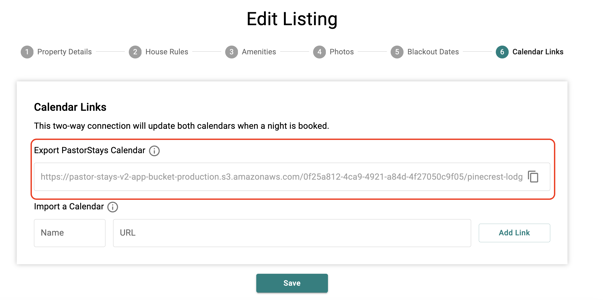
**Export Calendar: **Copy the link listed in PastorStays and add this to any calendar that supports iCal syncing.
> Now, any booking made on PastorStays will appear on the calendar where the link was attached.
For more info on how to use iCal syncing with other platforms, please see the list below of available articles.
- [Airbnb iCal syncing](https://www.airbnb.com/help/article/99)
- [VRBO iCal syncing](https://help.vrbo.com/articles/How-do-I-import-my-iCal-or-Google-calendar)
- [Google Calendar iCal Sync](https://support.google.com/calendar/answer/37100?hl=en&co=GENIE.Platform%3DDesktop#:~:text=Use%20a%20link,public%20calendars.)
Please note: Only PastorStays bookings will transfer to other calendars. Manually blocked dates and the Availability window restrictions will NOT transfer.
- [Ministers](https://helpcenter.pastorstays.com/en//ministers?hsLang=en)
- [Hosts](https://helpcenter.pastorstays.com/en//hosts?hsLang=en)
- [Ambassadors](https://helpcenter.pastorstays.com/en//ambassadors?hsLang=en)
- [General](https://helpcenter.pastorstays.com/en//general?hsLang=en)
[.png?width=100&height=94&name=PastorStays%20ff-01%20(7).png "PastorStays ff-01 (7)")](https://helpcenter.pastorstays.com/?hsLang=en)
[mailto:hello@pastorstays.com](mailto:hello@pastorstays.com)
Copyright © 2024,